Profile
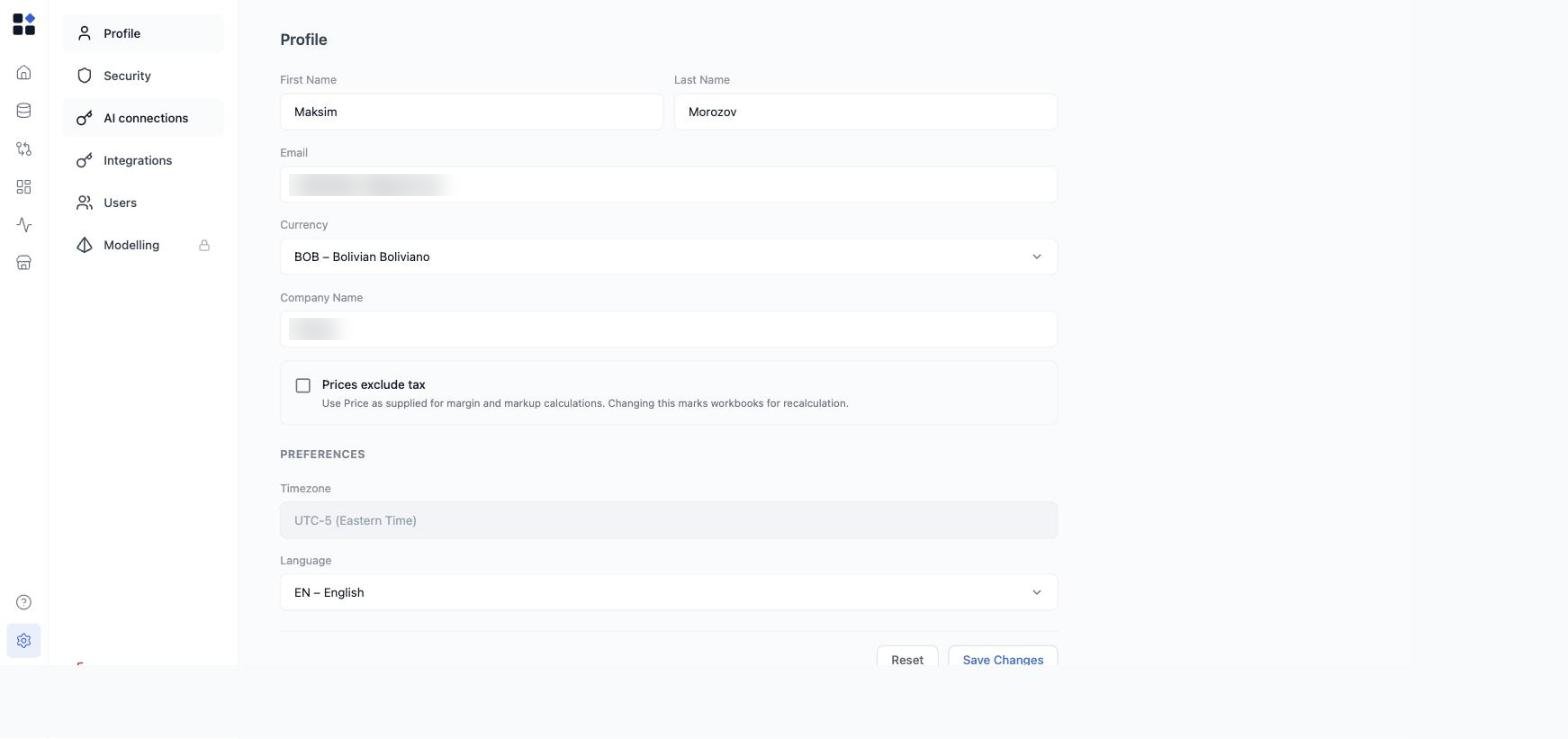
- First name and Last name - your display name (visible to teammates as the owner of grids and triggered runs).
- Email - the address you signed in with. It can’t be changed for Google accounts.
- Currency - your default display currency.
- Company Name - the company shown on generated artifacts such as Pricing Strategy decks.
- Prices exclude tax - when on, Retailgrid uses Price as supplied for margin and markup instead of deriving a net-of-tax price. Turn this on if your product prices already exclude tax (common for US and Canadian retailers). Changing it marks workbooks for recalculation.
- Preferences - Timezone and interface Language (English or Finnish).
Password
If you signed up with email and password, you can change your password from the Security tab. Enter your current password and a new one to update it. Forgot your password? Use the Forgot password? link on the sign-in page to request a reset email. If you sign in with Google, manage your password through Google. The Security tab shows that password change is unavailable for Google accounts.Language
Retailgrid currently supports English and Finnish as interface languages. Switch between them from the Language control in the Profile section above. Your selection follows you across the whole app:- Navigation, dialogs, and action labels.
- AG Grid chrome - column header menus, filter conditions, pagination.
- Date and number formatting on metric columns and run timestamps.
Account vs Organization
Retailgrid distinguishes two layers:- Account - your individual identity. Everyone on your team has their own.
- Organization - the workspace your team shares. Grids, datasets, and agents live at the Organization level.