

When to use Price Optimization
Reach for Price Optimization when:- You have at least a few weeks of transaction history per SKU - the model needs signal.
- You want a goal-based recommendation rather than a deterministic rule output.
- You want to try “what if we re-priced this category to maximize margin?” without committing to specific guardrails.
Open Price Optimization
In any grid:- Click Agents in the top toolbar (or the pinned Price Optimization button if you have one).
- Select Price Optimization from the All Agents modal.
- The configuration dialog opens with a Config by AI panel beside three tabs - General, Source, and Automation - and a Workflow panel on the right that shows the run pipeline: Optimize Prices → Apply Pricing Rules → Price Approval.
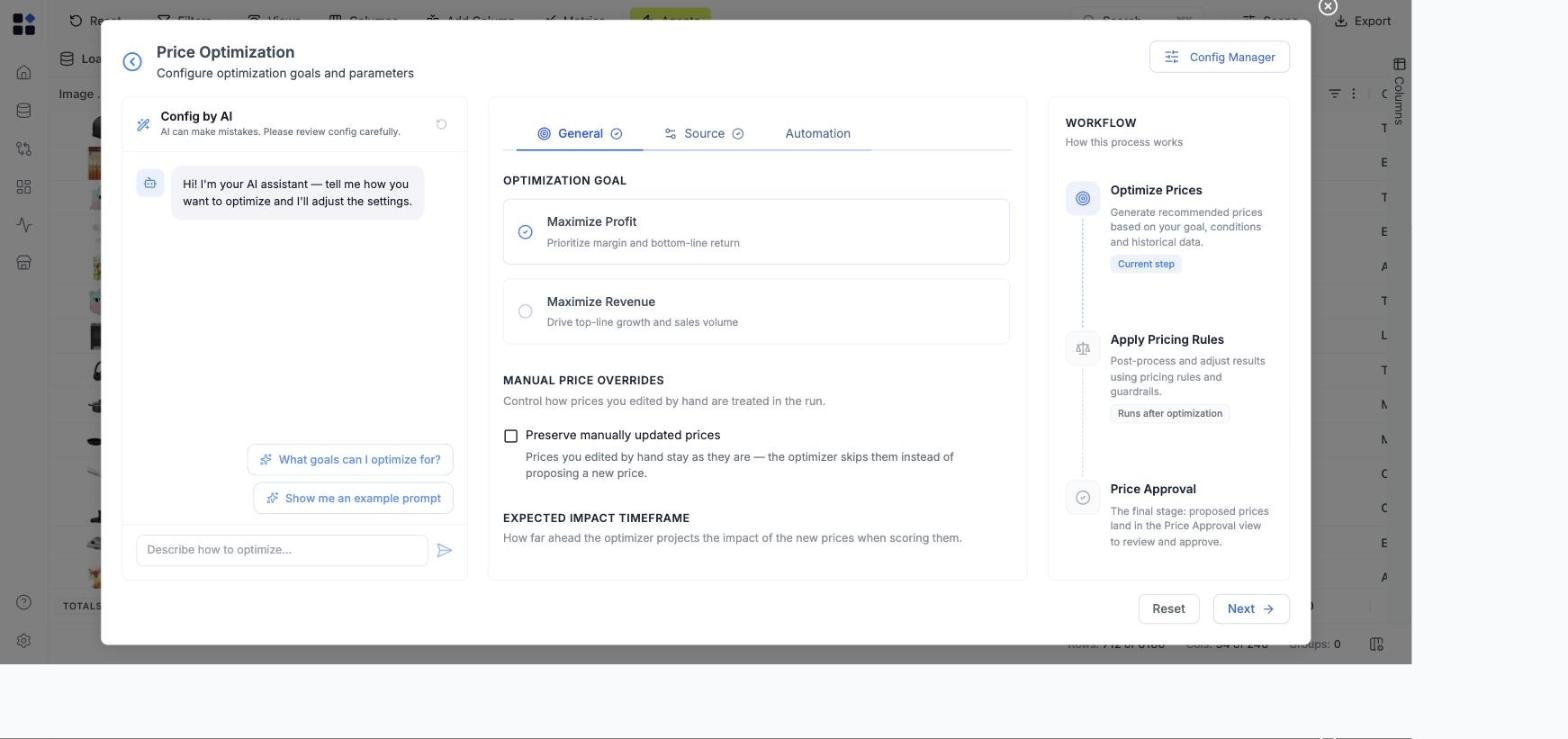
Configure by AI - describe what you want in plain language
The Config by AI panel sits beside the configuration tabs as a chat-style assistant, usable at any point. Use it when you know the outcome you want but not which knobs to turn.- Prompt - describe your goal in 1-3 sentences. Example: “Maximize profit across the KVI products without dropping margin too far or moving prices more than 10%.”
- Run AI - generates values into the configuration tabs.
Configure across three tabs
The tabs can be filled in order using Next. Config by AI lives beside the tabs and can be used at any point.General - goal, overrides, and timeframe
- Optimization Goal - Maximize Profit (prioritize margin and bottom-line return) or Maximize Revenue (drive top-line growth and sales volume).
- Manual price overrides - Preserve manually updated prices controls how prices you edited by hand are treated in the run. With it on, those prices stay as they are and the optimizer skips them instead of proposing a new price. Turn it on when you have hand-set prices you don’t want overwritten.
- Expected Impact Timeframe - how far ahead the optimizer projects the impact of the new prices when scoring them (e.g. Next 30 days).
Looking for confidence tiers and thresholds? Those are account-level demand model parameters, not per-run settings. They live in Settings → Modelling, along with clustering, recommendation corridors, seasonality, and model freshness. See Modelling. The tab is Admin only, because a change there affects every future run and recalculation on the account.
Source - scope and inputs
- Scope - run against the Full grid or a Sample of rows to validate the setup before a full run.
- Inputs - map the grid columns the model reads: Price (current selling price) and Cost (cost per unit). Historical sales/transactions provide the demand signal the model fits, and competitor prices (if present) let the model account for competitive position.
Read the result
After a run, each recommendation lands in its own cell in the output grid - one value per cell, so recommendations are easy to scan and act on row by row. Per recommendation you can:- Set the price type the recommended price should apply as (e.g. regular or promotional).
- Set the effective date the price should take effect.
- Proposed Price - the recommended price per SKU.
- Price Change and Price Change % - how far the recommendation moves the current price.
- New Unit Margin %, New Unit Margin % pp change, and Unit Margin % Change (%) - the margin at the recommended price, and the change against the starting margin.
- Confidence - High, Medium, or Low, reflecting how strong the model’s signal was for that SKU.
- Elasticity Tier and Elasticity - which fit the price response came from, and the coefficient used. Item is a fit on that SKU’s own history and is the strongest; Group borrows from a cluster of similar SKUs; seasonal variants (for example Item Low Season) fit a specific part of the year; Category Default is the fallback where a SKU has too little signal for any of the above. The tier is your quickest read on how much evidence sits behind a recommendation.
- Δ Sales Units, Δ Sales Value, Δ Gross Profit, and Δ Gross Margin % - the forecasted impact of the change over the selected horizon. See Sales forecast and price impact.
Common pitfalls
- Sparse sales history - SKUs with very few transactions get low confidence and small recommended changes. That’s intentional. For SKUs too thin to model on their own, the optimizer borrows demand signal from a cluster of similar SKUs rather than dropping out, so sparse items still get a sensible, lower-confidence suggestion.
- Recommendations go through approval, not straight to live - Price Optimization proposes prices; you review, adjust, and publish them through the price approval workflow. Nothing goes live without your sign-off.
- Goal mismatch - if you set Goal = Revenue, expect the model to drop prices on elastic SKUs. If you set Goal = Profit, expect the opposite. Pick the goal that matches the decision you’re making.
Related
- Agents overview
- Dynamic Pricing
- Pricing rules guide - the 8 rule types with worked examples
- Modelling - the account-level demand model parameters behind the recommendations
- Review and approve price changes
- Sales / Transactions data requirements
- Metrics glossary
- Runs