

Dynamic Pricing was previously called Rules Based Pricing. Same agent, same engine - only the name changed.
When to use Dynamic Pricing
Reach for Dynamic Pricing when you can describe the pricing logic you want:- Operational pricing - guardrails, promotions, parity to a competitor.
- Margin enforcement - you know the floor or band you want to stay in.
- Sync prices across a product family or set.
- Apply rounding to psychological price endings.
- Relative pricing within a group (good / better / best laddering).
Open Dynamic Pricing
In any grid:- Click Agents in the top toolbar (or the pinned Dynamic Pricing button if you have one).
- Select Dynamic Pricing from the All Agents modal.
- The configuration dialog opens with a Config by AI panel beside two configuration tabs: Rules and Parameters.
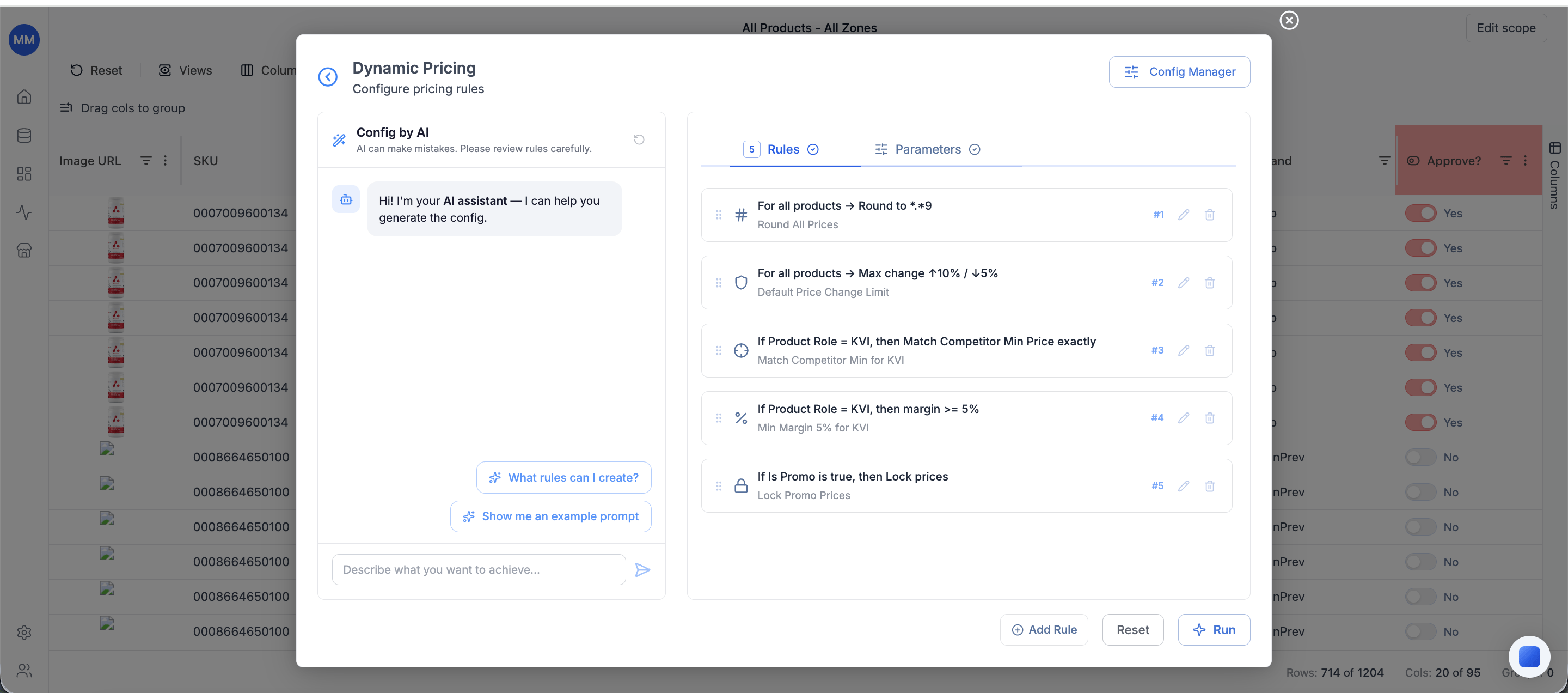
Configure by AI - describe what you want in plain language
The Config by AI panel sits beside the configuration tabs as a chat-style assistant, usable at any point. Use it when you know the outcome you want but not which rule type fits.- Prompt - describe your goal in 1-3 sentences. Example: “Set price 5% above cost, but never below the cheapest competitor.”
- AI model - currently Gemini 2.5 Flash.
- Run AI - generates rules and adds them to the Rules tab.
Configure the run
The Rules tab holds the rule list. Input mappings and run scope live under Parameters. The recommended order for first-time setup is inputs → scope → rules.Inputs (Parameters tab) - map Price and Cost
Two grid columns map to the algorithm’s reserved fields:- Price - the current selling price (defaults to
price). - Cost - cost per unit (defaults to
unit_cost).
Scope (Parameters tab) - Full Dataset or Sample 10 Rows
The scope controls which rows the rules run against:- Full Dataset - every row in the current workbook.
- Sample 10 Rows - server-side sampling against ten rows, intended to validate a rule setup before committing to a full run. Returns quickly and exposes configuration errors (missing references, contradictory rules, invalid conditions) without processing the whole grid.
Rules - the heart of the configuration
The Rules tab is where you list the rules to apply. Click Add Rule to open the rule type picker, configure each rule, and save it. The list shows all rules with their priorities; the badge on the tab header is the rule count.How rules are evaluated
For every row in scope, independently:- Rules are sorted by Priority (1 = highest, max 50).
- The engine walks rules top-to-bottom. Each rule narrows the row’s feasible price corridor.
- If a rule’s corridor doesn’t intersect the current corridor, the rule is violated (see Fallback Behavior).
- After all rules run, the final price is the value in the surviving corridor closest to the row’s current price.
- Price Rounding is always evaluated last regardless of its priority position; its priority number controls which other rules it can violate.
Store-level execution
When your grid is in SKU-Store view (one row per product-store combination), Dynamic Pricing runs at the SKU-Store level:- The engine emits one recommended price per product-store combination, using each store’s own price, cost, and competitor set.
- Conditions can target store attributes - country, channel, pricing zone - so a rule applies only to the matching stores. A margin floor for one country, competitor parity for one channel.
- Rules with no store conditions apply to all stores, so existing product-level rule setups keep working without modification.
Universal rule fields
Every rule has the same envelope, regardless of type:- Name - free text. Make it readable in traces (e.g. “Min margin 25%”).
- Priority (1-50) - lower number = higher priority. The engine evaluates highest-priority rules first.
- Conditions (collapsible) - filter that limits which rows the rule applies to.
- Fallback Behavior (collapsible) - what to do when the rule conflicts with the current corridor or the row is missing required data.
- Rule-specific parameters (see each rule type below).
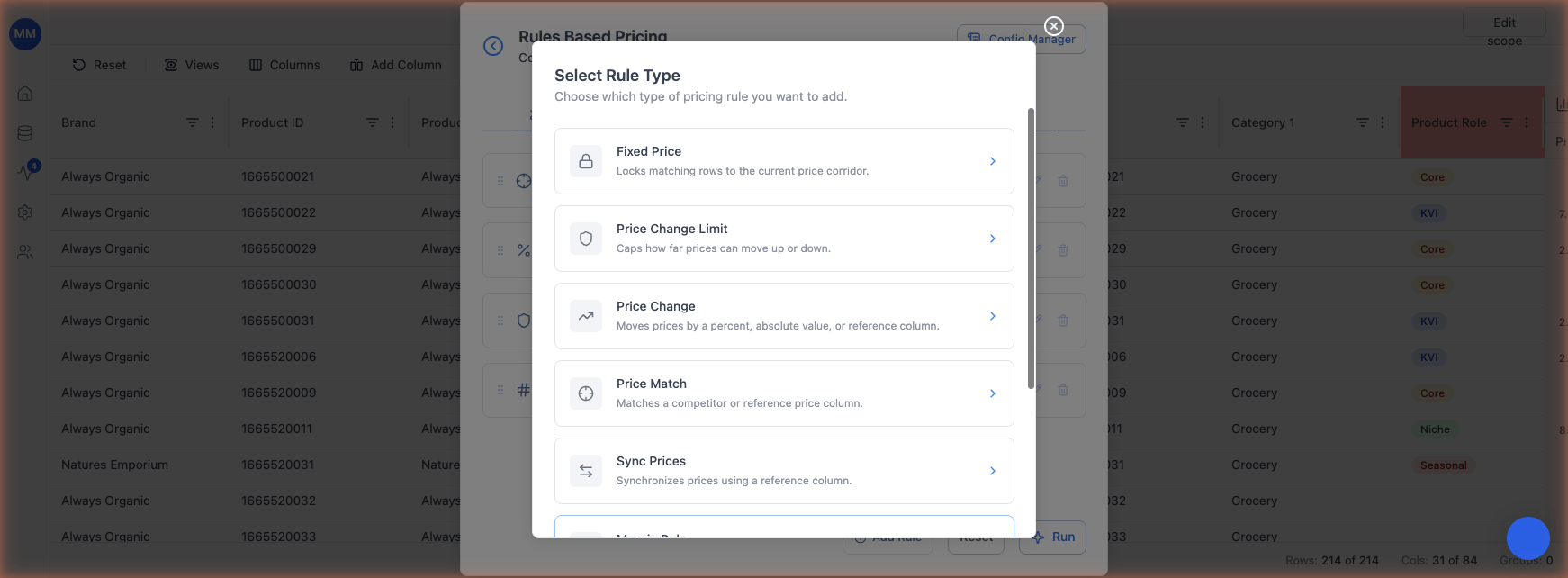
The 8 rule types
Fixed Price
Locks matching rows to their current price. The final price equals the input price; no later rule can move it.- Parameters: none.
- Corridor:
[current_price, current_price]- a single point. - Use it for: promo prices, regulated SKUs, manually approved prices.
- Gotcha: any later rule whose corridor doesn’t contain the current price will be marked violated for those rows.
Price Change Limit
Caps how far prices can move from the current price. Use it as an outer corridor (Maximum) or as a dead zone forbidding micro-changes (Minimum).- Limit Type: Maximum (outer corridor) or Minimum (dead zone).
- Increase: Percent or Absolute, with a value.
- Decrease: Percent or Absolute, with a value.
- Maximum corridor:
[base - decrease, base + increase]. Prices outside are pulled to the nearest boundary. - Minimum (dead zone): forbids changes smaller than the threshold. Encoded internally as an inverted corridor; this is the only rule type that legitimately produces
lo > hi.
Price Change
Moves prices by a percent, an absolute amount, or a reference column. Always produces a single target price.- Value Type: Percent, Absolute, or Column.
- Value: the percent / absolute number, or the reference column.
- Formulas:
- Note: always computed relative to the base price (current price), not relative to whatever the running candidate is at this rule’s priority. So a +5% Price Change applied after a Margin Rule still adds 5% to the original price, not to the margin-derived price.
Price Match
Aligns the price to a reference column (typically a competitor price), either exactly or within a percentage corridor.- Reference Column: numeric column.
- Operator:
Equals(single point) orBetween(corridor). - From / To values (when
Between): lower / upper percent bounds. - Corridor:
- When violated: the engine clamps the price to the boundary closest to this rule’s wanted corridor (“stretch toward what the rule wanted”).
Sync Prices
Forces all rows in a group to share one identical final price. A dynamic rule - it intersects the corridors of all group members and resolves a single group target at its priority moment.- Group Column: string or categorical column (e.g.
product_family). - Resolution cascade (in order):
- Mode - if any current price is shared by 2+ members, use it.
- Sales-weighted - if all current prices are unique and a
sales_unitscolumn exists, use the price of the highest-selling member. - Median of group’s current prices.
- Three cases after intersecting member corridors:
- Full intersection: all group members get the same price.
- Partial intersection: the engine drops outlier SKUs (smallest contribution to overlap) one by one until the rest agree. Outliers are marked Sync-violated and priced individually.
- No intersection: the whole group is marked Sync-violated and each SKU is priced individually.
- Scope gotcha: Sync only groups rows matching its conditions. Rows outside the conditions are completely unaffected - the rule doesn’t appear in their applied / violated lists.
- Special fallback: when Sync is violated, the engine doesn’t “stretch toward Sync’s corridor” (Sync has no numeric corridor). Instead, each affected SKU is priced closest to its own current price.
Margin Rule
Constrains the price to a margin or markup target derived from Cost. Static - corridor is computed before the engine runs.- Margin Type: Margin or Markup.
- Constraint: Exact (single point) or Between (corridor).
- Value Source: Percent, Absolute, or Column.
- Value (or From / To when Constraint is Between).
- Formulas (with
T = value / 100for percent): - Examples: “Margin exactly 25%” ->
[cost / 0.75, cost / 0.75]. “Markup between 30% and 50%” ->[cost * 1.30, cost * 1.50]. - Validation:
Value Source = Columnis only valid withConstraint = Exact. Combining Column with Between returns an error.
Price Rounding
Forces final prices to end in psychologically allowed endings (e.g.*.99, *.95, *.00).
- Price Scope: All prices, or a price-range filter (Equals / Between).
- Pattern (allowed endings): comma-separated patterns, e.g.
*.99, *.95. - Excluded endings: patterns to avoid, e.g.
*.77. - Rounding Direction: Up (smallest valid above candidate), Down (largest valid below candidate), or Closest (nearest valid that still falls inside the feasible range).
- Always last: Rounding runs after every other rule, regardless of its position in the priority list. Its priority number determines which other rules it may violate (only those with lower priority).
- Gotcha: if no valid ending exists inside the feasible range, the rule is violated and the price stays unrounded - it isn’t nulled.
Price Relations
Maintains a relative price structure within a group. Example: keep the Profit Driver SKU 6% below the Traffic Driver.- Group Column: string or categorical.
- Price Type: Price or Unit Price.
- Relationship Type: One by one (each item N priced relative to item N-1) or Same gap (same gap from anchor for every member).
- Gap Value Type: Percent or Absolute.
- Gap Value.
- Anchor Logic: Highest priced (anchor = group member with highest current price) or Explicit item.
- Formulas:
- Cascade: each chain SKU gets a single-point corridor. If the anchor moves due to a higher-priority conflict, the entire chain is recomputed.
- Composes with rounding only: because Price Relations leaves single-point corridors, only Price Rounding can compose meaningfully after it. Other lower-priority rules will either intersect the exact point (no conflict) or be violated.
Conditions - filter which rows a rule applies to
Open the Conditions section on any rule to limit it to a subset of rows. Rules with no conditions apply to every row in scope.- Each condition is a column + operator + value triplet.
- Conditions combine via AND (no OR).
- Supported operators:
=,!=,>,<,>=,<=,IN,NOT IN,IS TRUE,IS FALSE.
Fallback Behavior - what happens when a rule can’t apply cleanly
Open the Fallback Behavior section on any rule to control conflict and missing-data handling. Conflict behavior- Follow priority (default) - the rule is marked violated, the corridor stays at the last valid range, and the engine picks the boundary closest to what this rule wanted (“stretch toward the violated rule”).
- Return error - calculation stops for this row. The row gets
rbp_status = errorand the offending rule’s name. Recommended for compliance-critical rules.
- Ignore (default) - the rule is skipped for rows missing required data; the row continues evaluating other rules.
- Return error - the run fails when a required column value is missing.
Save and load configurations
Click Config Manager in the top right to save the current configuration as a named config or load a previously-saved one. A config captures the full setup - scope, inputs, AI prompt history, and the entire rule list. You can load a config onto the same grid or a different one. This is the right tool for monthly recurring runs and for sharing setups across teammates.Validate with Sample 10 Rows, then run
The recommended flow:- Configure rules.
- Set the scope to Sample 10 Rows and click Run.
- Inspect the Rules Based Price column on the sampled rows; open the Price Analysis panel on a few to confirm rules fired as expected.
- Switch the scope back to Full Dataset and click Run.
Read the result
After a run, the grid shows a new Rules Based Price column with the calculated price per row. Click any cell in that column to open the right-side Price Analysis panel, which explains how the price was derived.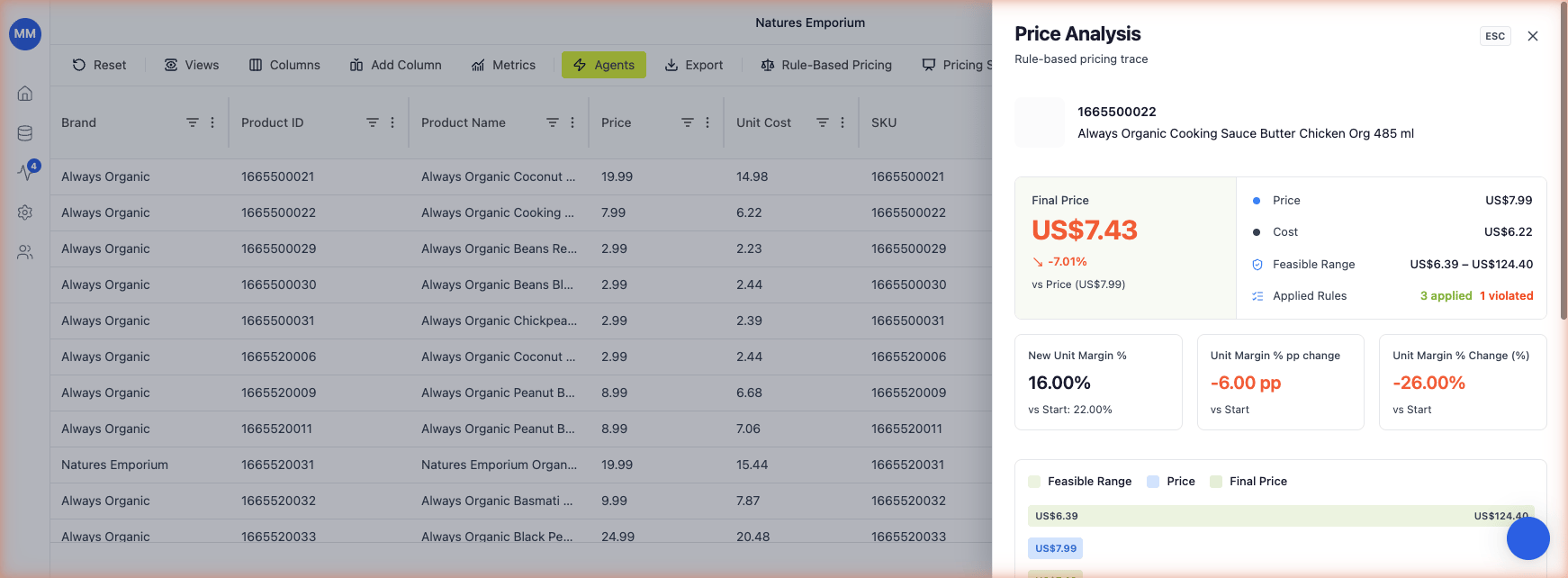
Rule-based pricing trace subtitle.
The summary block has two columns:
Left column - Final Price
- Final Price - the calculated Rules Based Price, large and prominent.
- % delta vs Start Price - how far the calculated price moved from the row’s starting price (positive = up, negative = down).
- Start Price - the row’s starting price (the input).
- Cost - the row’s unit cost (the input).
- Feasible Range - the price corridor that survived after every applied rule narrowed it. The Final Price is the point inside this range closest to Start Price.
- Applied Rules - count of rules that fired successfully, plus a count of rules that were violated (next to it).
- New Unit Margin % - margin at the calculated Rules Based Price, with the starting margin shown below as
vs Start: X%. - Unit Margin % pp change - percentage-point change vs the starting margin.
- Unit Margin % Change (%) - relative change in margin (pp change / starting margin).
Output columns
The agent writes these columns back to the grid:
Hide what you don’t need via the Columns panel. Pin Rules Based Price to the right for at-a-glance review.
Common pitfalls
- Missing
cost- Margin Rules can’t run without it. Either map a Cost column in the Parameters tab or remove margin-based rules. - Currency mismatch - if products and competitors use different currencies, configure FX in account settings before running competitor-based rules.
- Conditions too narrow - if no rows match, the rule is silently skipped. Watch the row counts in Sample runs.
- Fixed Price followed by other rules - Fixed Price is a single-point corridor; almost any later rule will be violated for those rows. Expected behavior.
- Price Change relative to base - Price Change always starts from the current price, not from whatever earlier rules produced. If you need cascading deltas, use Price Relations instead.
- Rounding never reaches a valid ending - if the surviving corridor is narrower than your Pattern’s tick spacing, Rounding is violated and the price stays unrounded.
Related
- Pricing rules guide - business-user walkthrough of the 8 rule types with worked examples
- Agents overview
- Price Optimization
- Pricing Strategy
- Manage stores
- Product and SKU-Store grid views
- Add columns
- Metrics glossary
- Currency
- Runs