> ## Documentation Index
> Fetch the complete documentation index at: https://docs.retailgrid.io/llms.txt
> Use this file to discover all available pages before exploring further.
# Runs overview
> Track every asynchronous job - CSV imports, agent runs, optimization, dataset processing - from one place.
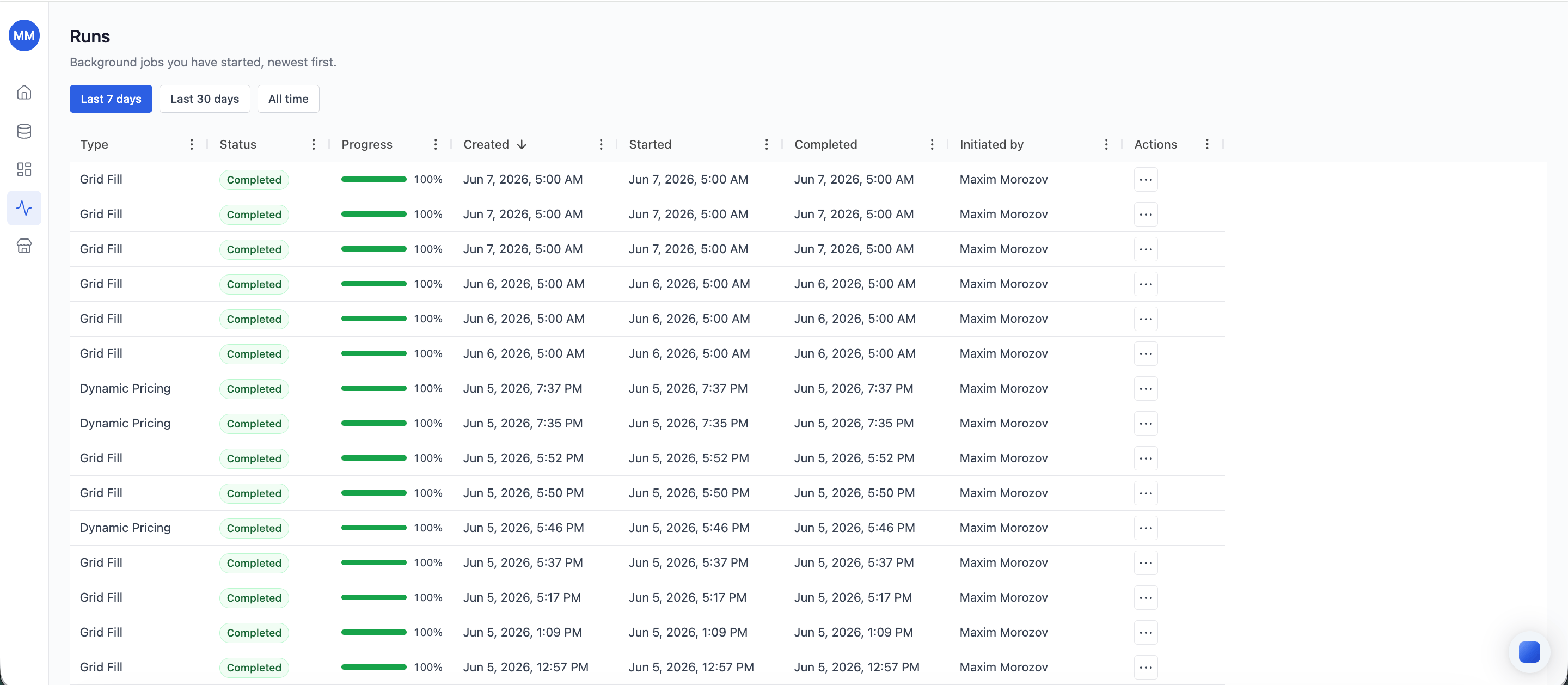
The **Runs** section in the left sidebar shows every asynchronous job Retailgrid is processing or has finished processing for you. Open it to see what's running, what succeeded, and what failed.
 ## What shows up in Runs
Any job that takes more than a moment runs asynchronously. The Runs section captures:
* **CSV / XLSX imports** - kicked off when you upload a dataset.
* **Agent runs** - Dynamic Pricing, Price Optimization, and Pricing Strategy.
* **Dataset rebuilds** - triggered when you replace a dataset.
* **Bulk operations** - large multi-grid actions where applicable.
The Runs page is the single source of truth for "what is the system doing right now?" and "what happened to that thing I clicked Run on five minutes ago?"
## Time window
By default the Runs list shows runs from the **last 7 days**. Switch to **Last 30 days** or **All time** with the buttons above the list. Most teams stay on the 7-day default - older runs rarely need attention and the shorter window keeps the list scannable.
## Active runs badge
The Runs icon in the left sidebar shows a small badge with the number of currently running jobs (queued + running). The badge clears once everything finishes, so it's a quick at-a-glance signal for "is anything still in flight?".
## Read the Runs list
Each row is one run:
| Column | What it shows |
| :--------------- | :--------------------------------------------------------------------------------------------------------------------------------------- |
| **Type** | The agent that started the run (Dynamic Pricing, Pricing Strategy, etc.) or a system label (Import, Dataset rebuild) for non-agent jobs. |
| **Triggered by** | The user who started it (or `system` for scheduled jobs). |
| **Started** | When the run entered the queue. |
| **Status** | Current state - see the table below. |
| **Duration** | How long the run took (or has been running). |
| **Target** | The grid or dataset the run is acting on. |
## Status values
| Status | What it means |
| :---------- | :-------------------------------------------------------------------------------------------------------------- |
| `Queued` | The run is waiting for a worker to pick it up. |
| `Running` | A worker is processing the run. |
| `Succeeded` | The run finished and wrote results back to the target. |
| `Partial` | The run completed but skipped some rows (e.g. validation failures on a subset). Open the run to see which rows. |
| `Failed` | The run errored out. The run detail shows the error and the inputs that produced it. |
| `Canceled` | A user canceled the run before it finished. |
## Drill into a run
Click any row to open the run's detail view:
* **Inputs** - the configuration the run was started with.
* **Logs** - what the worker did, step by step.
* **Output** - the columns or artifacts the run produced (and links back to the grid where they live).
* **Errors** - if any rows failed validation or rule execution, the row IDs and reasons.
## Retry a failed run
Failed runs show a **Retry** action in the row's three-dot menu. Retry re-runs with the same inputs - useful when the failure was transient (timeout, infrastructure hiccup). For configuration errors, edit the source (rule config, dataset) and trigger a fresh run from the original surface (Agents modal, Datasets page).
## Cancel a running run
Long-running jobs can be canceled from the same three-dot menu. Cancellation is best-effort: workers stop at the next checkpoint, so you may see a few seconds of work continue before the status flips to `Canceled`.
## Related
* [Datasets](/data-requirements/datasets)
* [Agents overview](/agents/overview)
## What shows up in Runs
Any job that takes more than a moment runs asynchronously. The Runs section captures:
* **CSV / XLSX imports** - kicked off when you upload a dataset.
* **Agent runs** - Dynamic Pricing, Price Optimization, and Pricing Strategy.
* **Dataset rebuilds** - triggered when you replace a dataset.
* **Bulk operations** - large multi-grid actions where applicable.
The Runs page is the single source of truth for "what is the system doing right now?" and "what happened to that thing I clicked Run on five minutes ago?"
## Time window
By default the Runs list shows runs from the **last 7 days**. Switch to **Last 30 days** or **All time** with the buttons above the list. Most teams stay on the 7-day default - older runs rarely need attention and the shorter window keeps the list scannable.
## Active runs badge
The Runs icon in the left sidebar shows a small badge with the number of currently running jobs (queued + running). The badge clears once everything finishes, so it's a quick at-a-glance signal for "is anything still in flight?".
## Read the Runs list
Each row is one run:
| Column | What it shows |
| :--------------- | :--------------------------------------------------------------------------------------------------------------------------------------- |
| **Type** | The agent that started the run (Dynamic Pricing, Pricing Strategy, etc.) or a system label (Import, Dataset rebuild) for non-agent jobs. |
| **Triggered by** | The user who started it (or `system` for scheduled jobs). |
| **Started** | When the run entered the queue. |
| **Status** | Current state - see the table below. |
| **Duration** | How long the run took (or has been running). |
| **Target** | The grid or dataset the run is acting on. |
## Status values
| Status | What it means |
| :---------- | :-------------------------------------------------------------------------------------------------------------- |
| `Queued` | The run is waiting for a worker to pick it up. |
| `Running` | A worker is processing the run. |
| `Succeeded` | The run finished and wrote results back to the target. |
| `Partial` | The run completed but skipped some rows (e.g. validation failures on a subset). Open the run to see which rows. |
| `Failed` | The run errored out. The run detail shows the error and the inputs that produced it. |
| `Canceled` | A user canceled the run before it finished. |
## Drill into a run
Click any row to open the run's detail view:
* **Inputs** - the configuration the run was started with.
* **Logs** - what the worker did, step by step.
* **Output** - the columns or artifacts the run produced (and links back to the grid where they live).
* **Errors** - if any rows failed validation or rule execution, the row IDs and reasons.
## Retry a failed run
Failed runs show a **Retry** action in the row's three-dot menu. Retry re-runs with the same inputs - useful when the failure was transient (timeout, infrastructure hiccup). For configuration errors, edit the source (rule config, dataset) and trigger a fresh run from the original surface (Agents modal, Datasets page).
## Cancel a running run
Long-running jobs can be canceled from the same three-dot menu. Cancellation is best-effort: workers stop at the next checkpoint, so you may see a few seconds of work continue before the status flips to `Canceled`.
## Related
* [Datasets](/data-requirements/datasets)
* [Agents overview](/agents/overview)