> ## Documentation Index
> Fetch the complete documentation index at: https://docs.retailgrid.io/llms.txt
> Use this file to discover all available pages before exploring further.
# Competitor matching
> Validate the latest competitor scan before you price against it - coverage, match quality, blind spots, and price sanity.
**Competitor matching** is where you check a competitor scan before you trust it. Open it from the left sidebar. The page reads one thing: the latest scan published for your organization, with the observed date range in the subtitle.
 ## Why validate a scan first
Competitor prices drive your Price Match rules, your CPI, and every competitor-gap metric. A scan with thin coverage or bad matches moves prices quietly, and it is hard to spot after the fact. Validating takes a few minutes and is cheaper than unwinding a bad repricing.
Run through this page whenever a new scan lands, and before any pricing pass that leans on competitor data.
## The headline figures
Six tiles across the top tell you how much of your catalog the scan can actually support a decision on:
| Tile | What it counts |
| :------------------------------- | :----------------------------------------------------------------------------------- |
| **Catalog SKUs** | The size of your product master, as the denominator for everything else. |
| **SKUs with a competitor price** | How much of the catalog the scan reached at all, and how much still has nothing. |
| **Competitor price points** | Total matched observations, and the average number of competitors per covered SKU. |
| **Repricing-ready SKUs** | Direct matches at high confidence. This is the set you can actually reprice against. |
| **SKUs needing review** | The best match sits below the confidence line. Worth a look before you rely on them. |
| **SKUs with no match** | No competitor price at all. The **Blind spots** tab breaks these down. |
The gap between **SKUs with a competitor price** and **Repricing-ready SKUs** is the number to watch. Coverage tells you the scan found something; repricing-ready tells you it found something you can price against.
## Filter the scan
Four filters sit across the top of the page:
| Filter | What it narrows to |
| :----------- | :------------------------------------------- |
| **Products** | Active products only, or your whole catalog. |
| **Cost** | Rows with a unit cost above zero. |
| **Price** | Rows with a selling price above zero. |
| **Stock** | Rows with stock above zero. |
The filters are global to the page. Every figure and the row table are computed from the same filtered pass over the scan, so no two tabs can show you conflicting answers.
Start unfiltered to see the raw scan. Narrow to active, in-stock, priced products when you want the view that matches what you actually sell.
## Coverage - how much of the catalog was reached
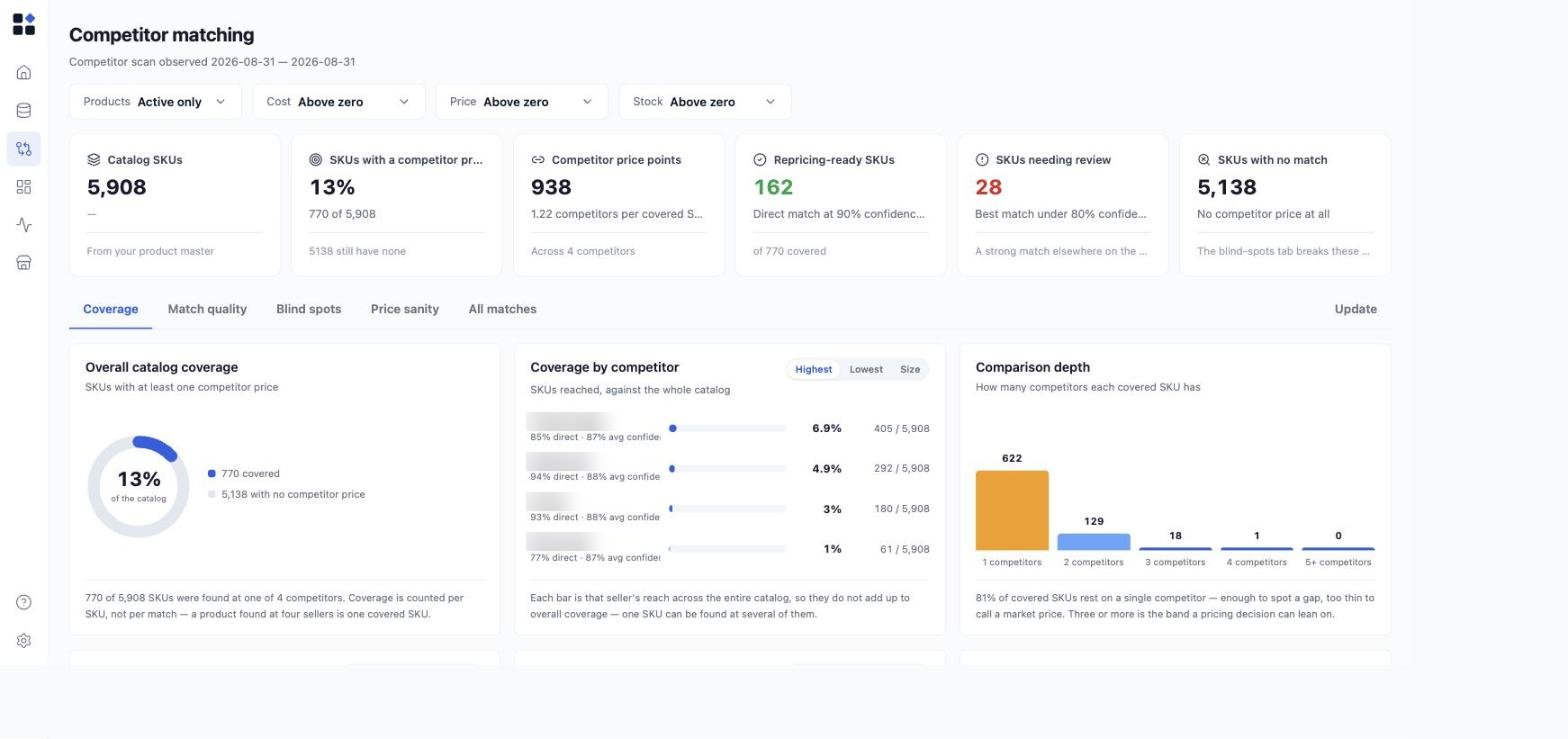
* **Overall catalog coverage** - the share of SKUs with at least one competitor price. Coverage is counted per SKU, not per match: a product found at four sellers is one covered SKU.
* **Coverage by competitor** - each competitor's reach across the whole catalog, with the share of its matches that are direct and its average confidence. Sort by **Highest**, **Lowest**, or **Size**. These bars do not add up to overall coverage, because one SKU can be found at several sellers.
* **Comparison depth** - how many competitors each covered SKU has. This is the tile that tells you whether you have a market price or just a data point. One competitor is enough to spot a gap; three or more is the band a pricing decision can lean on.
## Match quality - how much to trust the matches
## Why validate a scan first
Competitor prices drive your Price Match rules, your CPI, and every competitor-gap metric. A scan with thin coverage or bad matches moves prices quietly, and it is hard to spot after the fact. Validating takes a few minutes and is cheaper than unwinding a bad repricing.
Run through this page whenever a new scan lands, and before any pricing pass that leans on competitor data.
## The headline figures
Six tiles across the top tell you how much of your catalog the scan can actually support a decision on:
| Tile | What it counts |
| :------------------------------- | :----------------------------------------------------------------------------------- |
| **Catalog SKUs** | The size of your product master, as the denominator for everything else. |
| **SKUs with a competitor price** | How much of the catalog the scan reached at all, and how much still has nothing. |
| **Competitor price points** | Total matched observations, and the average number of competitors per covered SKU. |
| **Repricing-ready SKUs** | Direct matches at high confidence. This is the set you can actually reprice against. |
| **SKUs needing review** | The best match sits below the confidence line. Worth a look before you rely on them. |
| **SKUs with no match** | No competitor price at all. The **Blind spots** tab breaks these down. |
The gap between **SKUs with a competitor price** and **Repricing-ready SKUs** is the number to watch. Coverage tells you the scan found something; repricing-ready tells you it found something you can price against.
## Filter the scan
Four filters sit across the top of the page:
| Filter | What it narrows to |
| :----------- | :------------------------------------------- |
| **Products** | Active products only, or your whole catalog. |
| **Cost** | Rows with a unit cost above zero. |
| **Price** | Rows with a selling price above zero. |
| **Stock** | Rows with stock above zero. |
The filters are global to the page. Every figure and the row table are computed from the same filtered pass over the scan, so no two tabs can show you conflicting answers.
Start unfiltered to see the raw scan. Narrow to active, in-stock, priced products when you want the view that matches what you actually sell.
## Coverage - how much of the catalog was reached
* **Overall catalog coverage** - the share of SKUs with at least one competitor price. Coverage is counted per SKU, not per match: a product found at four sellers is one covered SKU.
* **Coverage by competitor** - each competitor's reach across the whole catalog, with the share of its matches that are direct and its average confidence. Sort by **Highest**, **Lowest**, or **Size**. These bars do not add up to overall coverage, because one SKU can be found at several sellers.
* **Comparison depth** - how many competitors each covered SKU has. This is the tile that tells you whether you have a market price or just a data point. One competitor is enough to spot a gap; three or more is the band a pricing decision can lean on.
## Match quality - how much to trust the matches
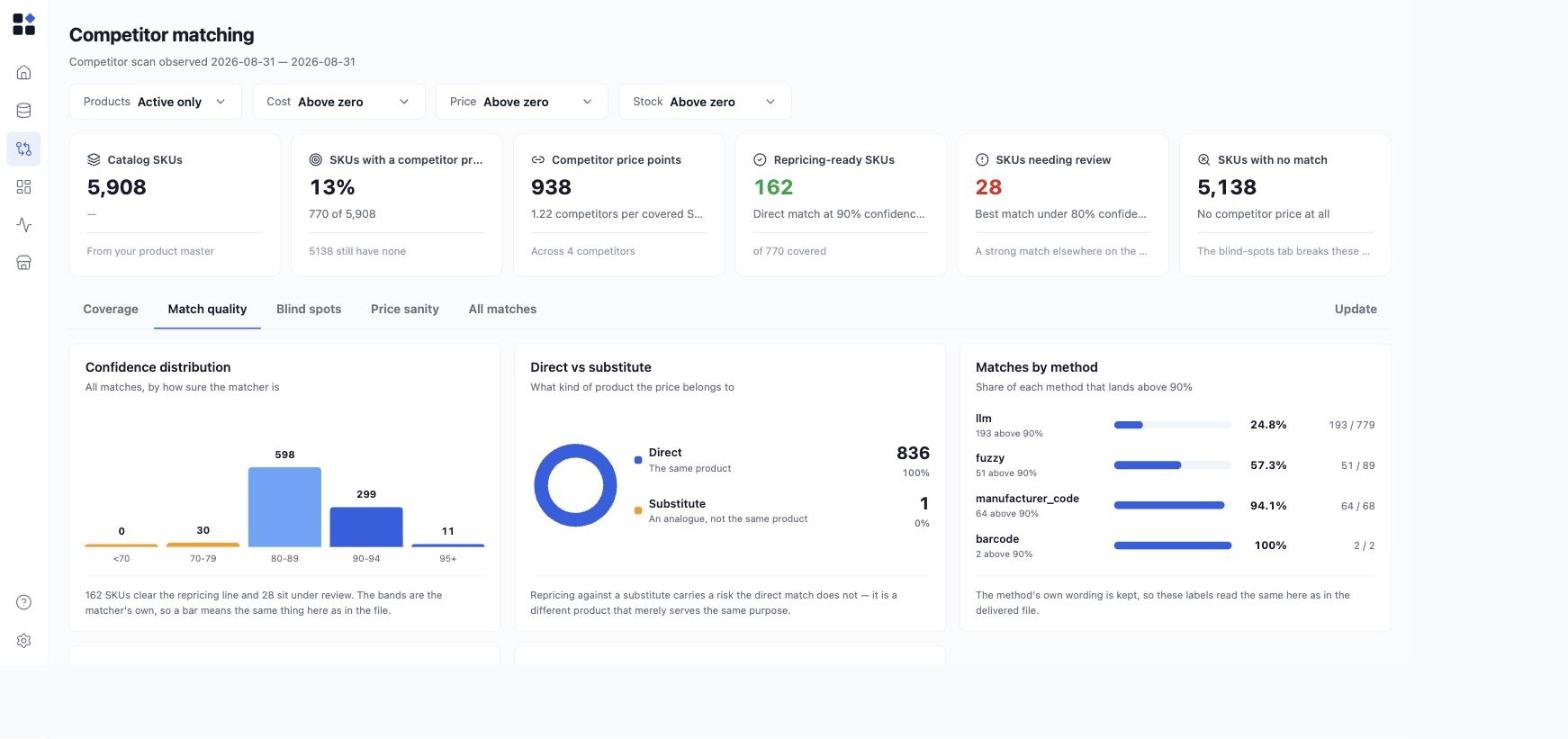 * **Confidence distribution** - every match bucketed by how sure the matcher was, in bands (under 70, 70-79, 80-89, 90-94, 95 and above). The bands are the matcher's own, so a bar means the same thing here as in the delivered file.
* **Direct vs substitute** - whether the price belongs to the same product (**Direct**) or to an analogue that merely serves the same purpose (**Substitute**). Repricing against a substitute carries a risk a direct match does not. Check this number before treating coverage as usable.
* **Matches by method** - the share of each matching method that clears high confidence: `barcode`, `manufacturer_code`, `fuzzy`, and `llm`. Barcode and manufacturer-code matches are near-certain and usually scarce; fuzzy and LLM matches are plentiful and need the confidence check. In markets where few products carry a barcode, expect the volume to sit in the lower-precision methods.
## Blind spots - where you have nothing
* **Confidence distribution** - every match bucketed by how sure the matcher was, in bands (under 70, 70-79, 80-89, 90-94, 95 and above). The bands are the matcher's own, so a bar means the same thing here as in the delivered file.
* **Direct vs substitute** - whether the price belongs to the same product (**Direct**) or to an analogue that merely serves the same purpose (**Substitute**). Repricing against a substitute carries a risk a direct match does not. Check this number before treating coverage as usable.
* **Matches by method** - the share of each matching method that clears high confidence: `barcode`, `manufacturer_code`, `fuzzy`, and `llm`. Barcode and manufacturer-code matches are near-certain and usually scarce; fuzzy and LLM matches are plentiful and need the confidence check. In markets where few products carry a barcode, expect the volume to sit in the lower-precision methods.
## Blind spots - where you have nothing
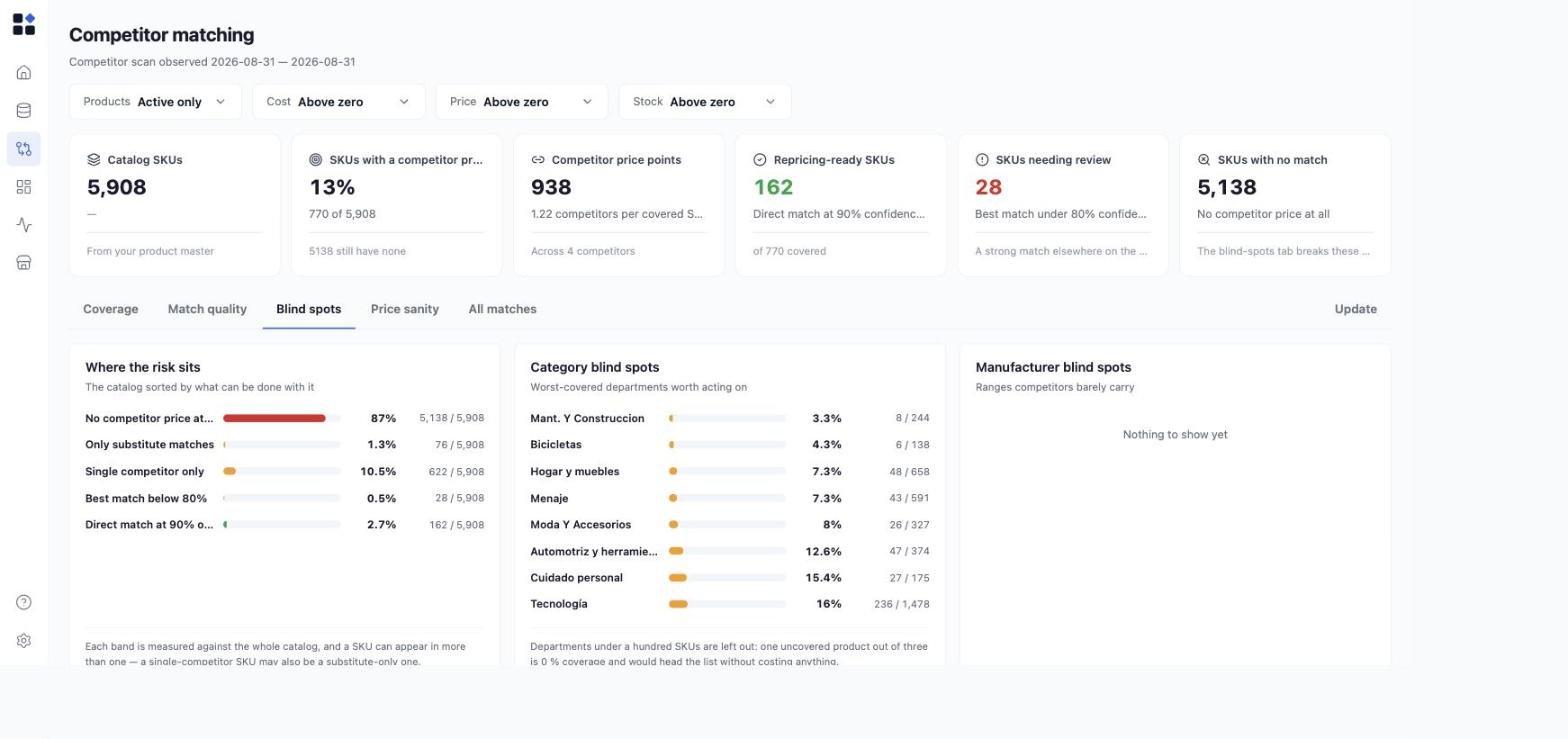 * **Where the risk sits** - the catalog sorted by what can be done with it: no competitor price at all, only substitute matches, a single competitor only, best match below the confidence line, and direct matches at high confidence. Each band is measured against the whole catalog and a SKU can appear in more than one, so the bands do not sum to 100%.
* **Category blind spots** - the worst-covered departments, ranked by what is worth acting on. Departments below a hundred SKUs are excluded: one uncovered product out of three reads as 0% coverage and would head the list without costing anything.
* **Manufacturer blind spots** - brands and ranges your competitors barely carry.
Use this tab to decide where to point the next scan, not to judge the current one.
## Price sanity - catching bad matches through their prices
* **Where the risk sits** - the catalog sorted by what can be done with it: no competitor price at all, only substitute matches, a single competitor only, best match below the confidence line, and direct matches at high confidence. Each band is measured against the whole catalog and a SKU can appear in more than one, so the bands do not sum to 100%.
* **Category blind spots** - the worst-covered departments, ranked by what is worth acting on. Departments below a hundred SKUs are excluded: one uncovered product out of three reads as 0% coverage and would head the list without costing anything.
* **Manufacturer blind spots** - brands and ranges your competitors barely carry.
Use this tab to decide where to point the next scan, not to judge the current one.
## Price sanity - catching bad matches through their prices
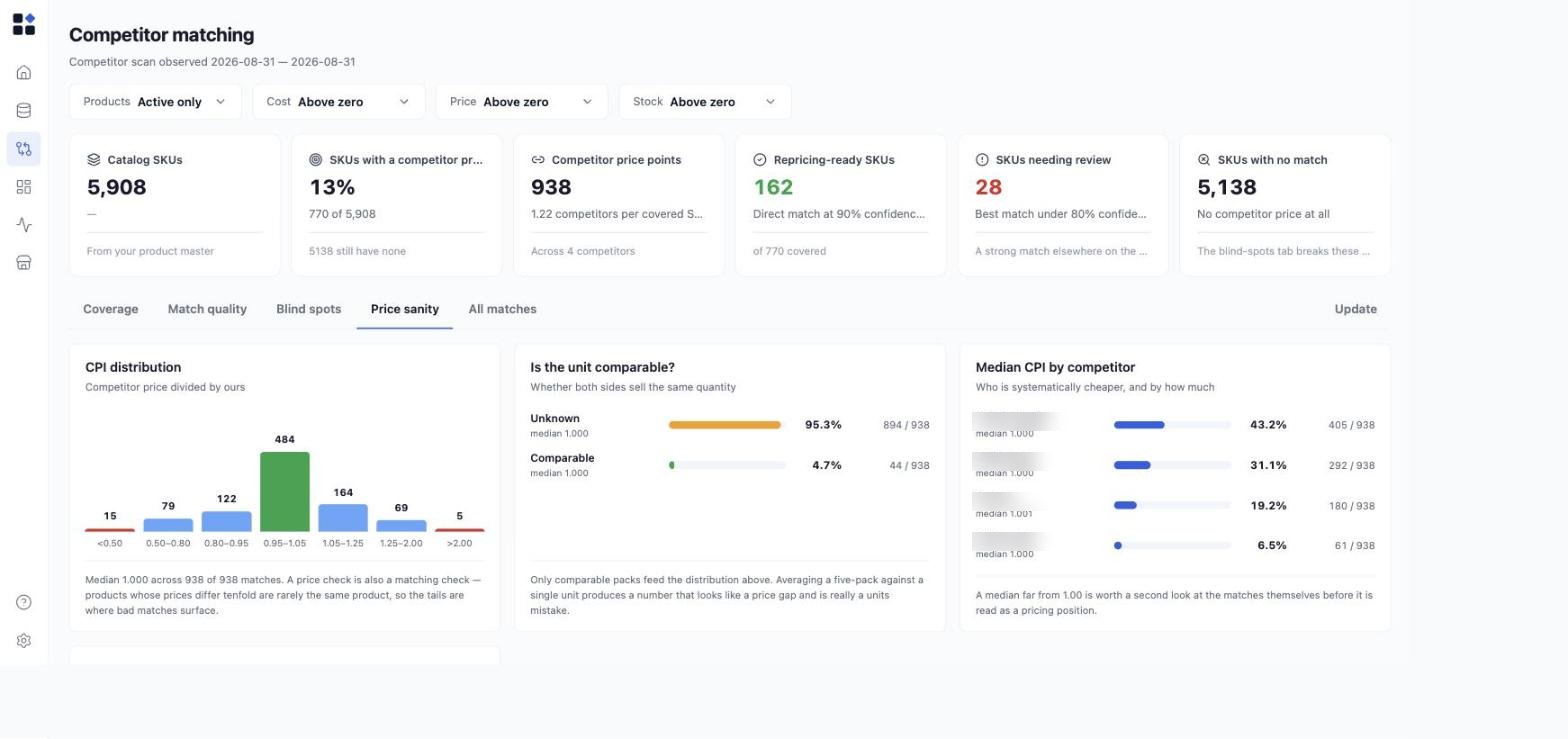 A price check is also a matching check. Products whose prices differ tenfold are rarely the same product, so the tails are where bad matches surface.
* **CPI distribution** - the competitor's price divided by yours, in bins from under 0.50 to over 2.00. A healthy scan clusters around 1.00. Look at the tails first.
* **Is the unit comparable?** - whether both sides sell the same quantity. Averaging a five-pack against a single unit produces a number that looks like a price gap and is really a units mistake. Only comparable packs feed the CPI distribution above.
* **Median CPI by competitor** - who is systematically cheaper, and by how much. A median far from 1.00 is worth a second look at that competitor's matches before you read it as a pricing position.
## All matches - the rows behind the figures
A price check is also a matching check. Products whose prices differ tenfold are rarely the same product, so the tails are where bad matches surface.
* **CPI distribution** - the competitor's price divided by yours, in bins from under 0.50 to over 2.00. A healthy scan clusters around 1.00. Look at the tails first.
* **Is the unit comparable?** - whether both sides sell the same quantity. Averaging a five-pack against a single unit produces a number that looks like a price gap and is really a units mistake. Only comparable packs feed the CPI distribution above.
* **Median CPI by competitor** - who is systematically cheaper, and by how much. A median far from 1.00 is worth a second look at that competitor's matches before you read it as a pricing position.
## All matches - the rows behind the figures
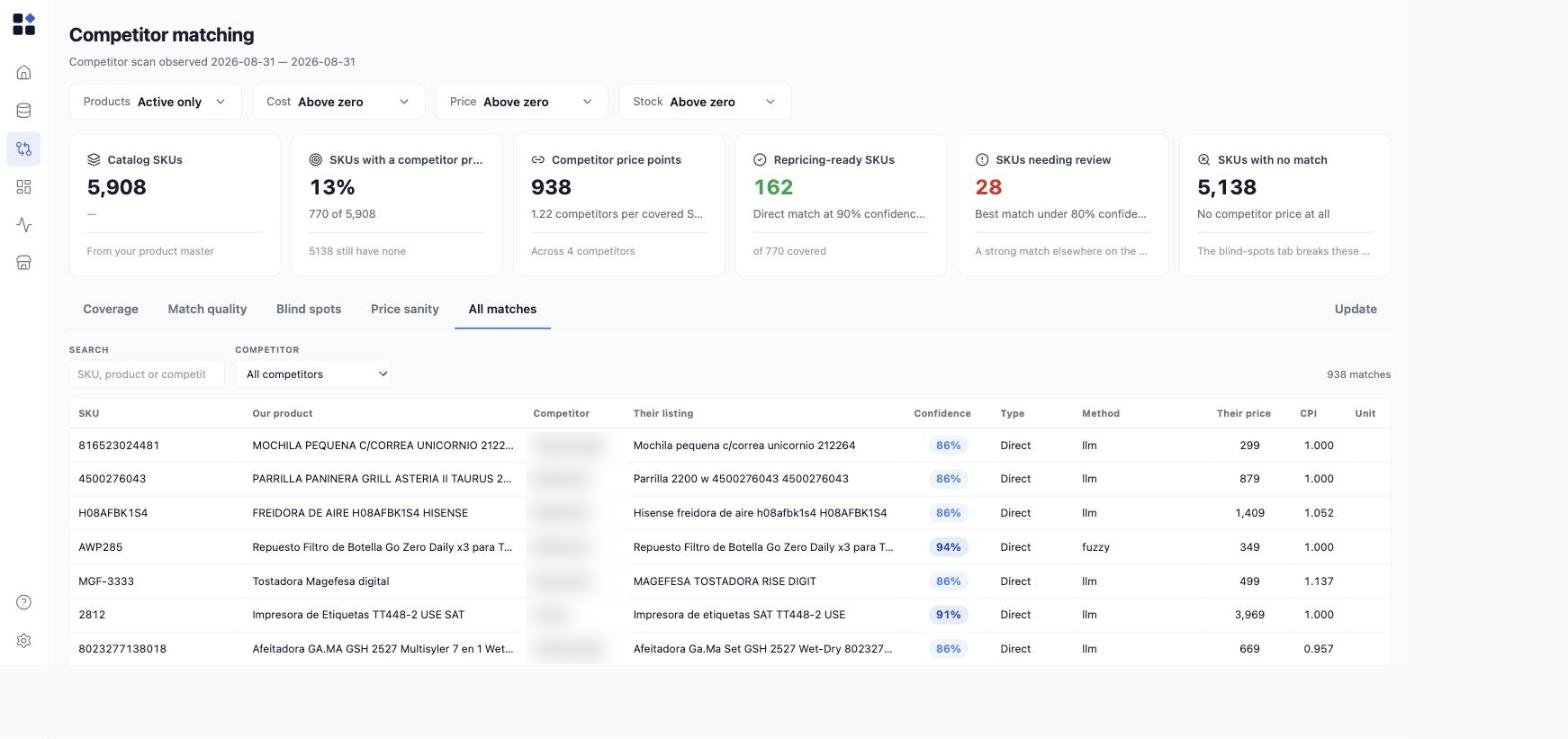 The row-level table, one row per match:
| Column | What it shows |
| :---------------- | :--------------------------------------------------------------------- |
| **SKU** | Your identifier for the product. |
| **Our product** | Your product name. |
| **Competitor** | Which competitor the price came from. |
| **Their listing** | The competitor's own product title, so you can judge the match by eye. |
| **Confidence** | How sure the matcher was. |
| **Type** | `Direct` or `Substitute`. |
| **Method** | Which method produced the match. |
| **Their price** | The competitor's price. |
| **CPI** | Their price divided by yours. |
| **Unit** | Whether the pack sizes are comparable. |
Search by SKU, product, or competitor, and filter to a single competitor. Both run on the server, so the response stays bounded on a scan holding tens of thousands of rows. Pages are capped at 200 rows.
This is the tab to open when a figure above looks wrong. Search into the extreme CPI values and read the listings: a bad match is usually obvious once you see the competitor's own title next to yours.
## Read the empty states honestly
The page distinguishes two situations that need opposite reactions from you:
* **Nothing published yet.** No scan has been delivered for your organization. The page says so rather than drawing a dashboard of zeros, because zeros would be indistinguishable from a catalog nobody has matched.
* **The scan could not be loaded.** The source behind the scan was unreachable. That is an incident, not an empty account. Retry, and if it persists reach out through the in-app messenger.
## Publish a new scan
**Update** publishes a new matched-data file and replaces the current scan.
A delivery carries three choices:
* **Coverage** - whether the file is a **full** sweep of your catalog or a **partial** one. This decides what the delivery is allowed to retire.
* **Covered competitors** - on a partial delivery, which competitors the file speaks for. Competitors outside that list keep their existing prices.
* **Allow large removal** - an explicit confirmation, required when the delivery would retire an unusually large share of existing matches. It exists so a truncated file cannot silently wipe your competitor set.
Conversion, validation, and publication run in the background, so the page stays responsive while a large file is processed. You can follow progress on the page while it runs.
## Common pitfalls
* **Reading coverage as readiness.** A high coverage number with most SKUs resting on a single competitor is not a market price. Check **Comparison depth** before you act.
* **Ignoring the substitute count.** A substitute match is a different product. Treating it as a direct one is how a price ends up anchored to the wrong item.
* **Trusting a competitor whose median CPI is far from 1.00.** That usually means its matches are wrong, not that it is cheap.
* **The figures are read-only.** The rows are a delivery artifact, replaced wholesale by the next delivery. There is nothing to correct here that the next scan would not overwrite. Fix the source data or the matching instead.
* **One delivery at a time.** A second publish is refused while one is already in flight for your organization. Wait for the first to finish rather than retrying.
* **A partial delivery that names no competitors** retires nothing and adds only what it carries. Name the competitors the file covers so stale matches for those competitors are cleared.
## Related
* [Price Monitoring](/agents/price-monitoring) - discover competitor prices with AI search
* [Competitor prices data spec](/data-requirements/competitors)
* [Assign competitors to stores, zones, and channels](/stores/assign-competitors)
* [Competitive Position dashboard](/dashboards/competitive-position)
* [Metrics glossary](/reference/metrics)
The row-level table, one row per match:
| Column | What it shows |
| :---------------- | :--------------------------------------------------------------------- |
| **SKU** | Your identifier for the product. |
| **Our product** | Your product name. |
| **Competitor** | Which competitor the price came from. |
| **Their listing** | The competitor's own product title, so you can judge the match by eye. |
| **Confidence** | How sure the matcher was. |
| **Type** | `Direct` or `Substitute`. |
| **Method** | Which method produced the match. |
| **Their price** | The competitor's price. |
| **CPI** | Their price divided by yours. |
| **Unit** | Whether the pack sizes are comparable. |
Search by SKU, product, or competitor, and filter to a single competitor. Both run on the server, so the response stays bounded on a scan holding tens of thousands of rows. Pages are capped at 200 rows.
This is the tab to open when a figure above looks wrong. Search into the extreme CPI values and read the listings: a bad match is usually obvious once you see the competitor's own title next to yours.
## Read the empty states honestly
The page distinguishes two situations that need opposite reactions from you:
* **Nothing published yet.** No scan has been delivered for your organization. The page says so rather than drawing a dashboard of zeros, because zeros would be indistinguishable from a catalog nobody has matched.
* **The scan could not be loaded.** The source behind the scan was unreachable. That is an incident, not an empty account. Retry, and if it persists reach out through the in-app messenger.
## Publish a new scan
**Update** publishes a new matched-data file and replaces the current scan.
A delivery carries three choices:
* **Coverage** - whether the file is a **full** sweep of your catalog or a **partial** one. This decides what the delivery is allowed to retire.
* **Covered competitors** - on a partial delivery, which competitors the file speaks for. Competitors outside that list keep their existing prices.
* **Allow large removal** - an explicit confirmation, required when the delivery would retire an unusually large share of existing matches. It exists so a truncated file cannot silently wipe your competitor set.
Conversion, validation, and publication run in the background, so the page stays responsive while a large file is processed. You can follow progress on the page while it runs.
## Common pitfalls
* **Reading coverage as readiness.** A high coverage number with most SKUs resting on a single competitor is not a market price. Check **Comparison depth** before you act.
* **Ignoring the substitute count.** A substitute match is a different product. Treating it as a direct one is how a price ends up anchored to the wrong item.
* **Trusting a competitor whose median CPI is far from 1.00.** That usually means its matches are wrong, not that it is cheap.
* **The figures are read-only.** The rows are a delivery artifact, replaced wholesale by the next delivery. There is nothing to correct here that the next scan would not overwrite. Fix the source data or the matching instead.
* **One delivery at a time.** A second publish is refused while one is already in flight for your organization. Wait for the first to finish rather than retrying.
* **A partial delivery that names no competitors** retires nothing and adds only what it carries. Name the competitors the file covers so stale matches for those competitors are cleared.
## Related
* [Price Monitoring](/agents/price-monitoring) - discover competitor prices with AI search
* [Competitor prices data spec](/data-requirements/competitors)
* [Assign competitors to stores, zones, and channels](/stores/assign-competitors)
* [Competitive Position dashboard](/dashboards/competitive-position)
* [Metrics glossary](/reference/metrics)