> ## Documentation Index
> Fetch the complete documentation index at: https://docs.retailgrid.io/llms.txt
> Use this file to discover all available pages before exploring further.
# Duplicate a grid
> Copy a grid's full configuration onto a new set of products, so a setup you have tuned once can be reused.
**Duplicate** copies a grid's configuration into a new grid. Everything you built up on the original comes across: the columns you added, your formula and metric columns, the layout, and the saved views. What you choose fresh is which products the copy covers.
Use it when a grid's setup is worth more than the row set it currently holds.
## When to duplicate rather than create
A new grid starts empty: no custom columns, no formulas, no metric columns, no views. If you have spent time building a working setup, duplicating carries it forward.
Good reasons to duplicate:
* **Same analysis, different category.** A margin-review setup that works for Dairy, pointed at Frozen.
* **Same analysis, different market.** One country's grid copied for another.
* **A safe place to experiment.** Duplicate, then try a different rule set or column layout without disturbing the grid your team works in.
* **Period-over-period work.** A quarterly review grid duplicated for the new quarter.
If you only need a different column layout on the same products, you want a saved [View](/grids/views), not a duplicate.
## Duplicate a grid
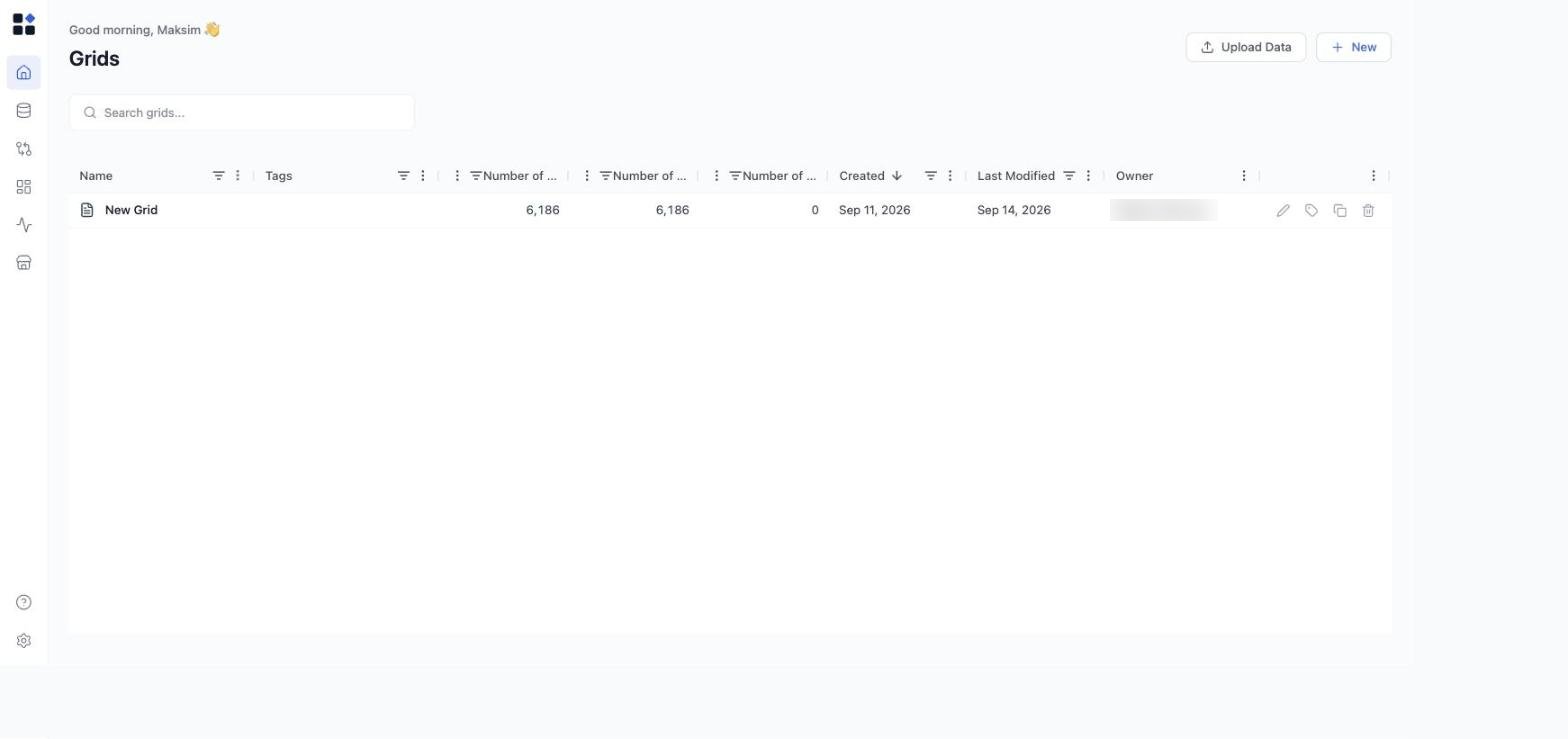
1. Open **Grids** in the left sidebar.
2. Find the grid you want to copy. Its row shows four actions on the right: rename, edit tags, **duplicate**, and remove.
3. Click **Duplicate Grid**.
4. Choose the scope for the copy - which products the new grid should cover. Keep the original's scope, or pick a different set the same way you would when [creating a grid](/grids/create-grid).
5. Confirm. The copy appears in the Grids list and its data is generated in the background.
 ## What comes across
The duplicate is a full configuration copy, not just a row set. That includes your added columns, formula columns, metric columns, column layout and widths, and saved views.
What does not come across is history. The copy is a new grid, so it has its own [Runs](/runs/overview) history and its own price approvals. Approvals and runs stay with the original.
## While the copy is generating
Generating the duplicate's data is a background job, so a large grid takes a moment to fill. Follow it in [Runs](/runs/overview).
If generation fails, you do not have to start over. The grid offers a retry that re-runs the generation with the same configuration, which is the right move when the failure was transient. For a configuration problem, fix the source and duplicate again.
## Common pitfalls
* **Duplicating before the original is finished.** Let the original's imports and refreshes settle first, or the copy is generated from a half-loaded grid.
* **Forgetting to rename.** Two grids with near-identical names get confusing fast. Rename the copy as soon as it appears.
* **Expecting agent configurations to follow automatically.** Saved agent configurations are managed in the agent dialog's Config Manager, and can be loaded onto any grid. See [Agents overview](/agents/overview).
## Related
* [Grids overview](/grids/overview)
* [Create grid](/grids/create-grid)
* [Configure grid](/grids/configure-grid)
* [Views](/grids/views)
* [Runs](/runs/overview)
## What comes across
The duplicate is a full configuration copy, not just a row set. That includes your added columns, formula columns, metric columns, column layout and widths, and saved views.
What does not come across is history. The copy is a new grid, so it has its own [Runs](/runs/overview) history and its own price approvals. Approvals and runs stay with the original.
## While the copy is generating
Generating the duplicate's data is a background job, so a large grid takes a moment to fill. Follow it in [Runs](/runs/overview).
If generation fails, you do not have to start over. The grid offers a retry that re-runs the generation with the same configuration, which is the right move when the failure was transient. For a configuration problem, fix the source and duplicate again.
## Common pitfalls
* **Duplicating before the original is finished.** Let the original's imports and refreshes settle first, or the copy is generated from a half-loaded grid.
* **Forgetting to rename.** Two grids with near-identical names get confusing fast. Rename the copy as soon as it appears.
* **Expecting agent configurations to follow automatically.** Saved agent configurations are managed in the agent dialog's Config Manager, and can be loaded onto any grid. See [Agents overview](/agents/overview).
## Related
* [Grids overview](/grids/overview)
* [Create grid](/grids/create-grid)
* [Configure grid](/grids/configure-grid)
* [Views](/grids/views)
* [Runs](/runs/overview)