> ## Documentation Index
> Fetch the complete documentation index at: https://docs.retailgrid.io/llms.txt
> Use this file to discover all available pages before exploring further.
# Dashboard editor
> Build and modify dashboards in one place - a manual builder with drag & drop and a widget picker, plus an AI assistant working on the same configuration.
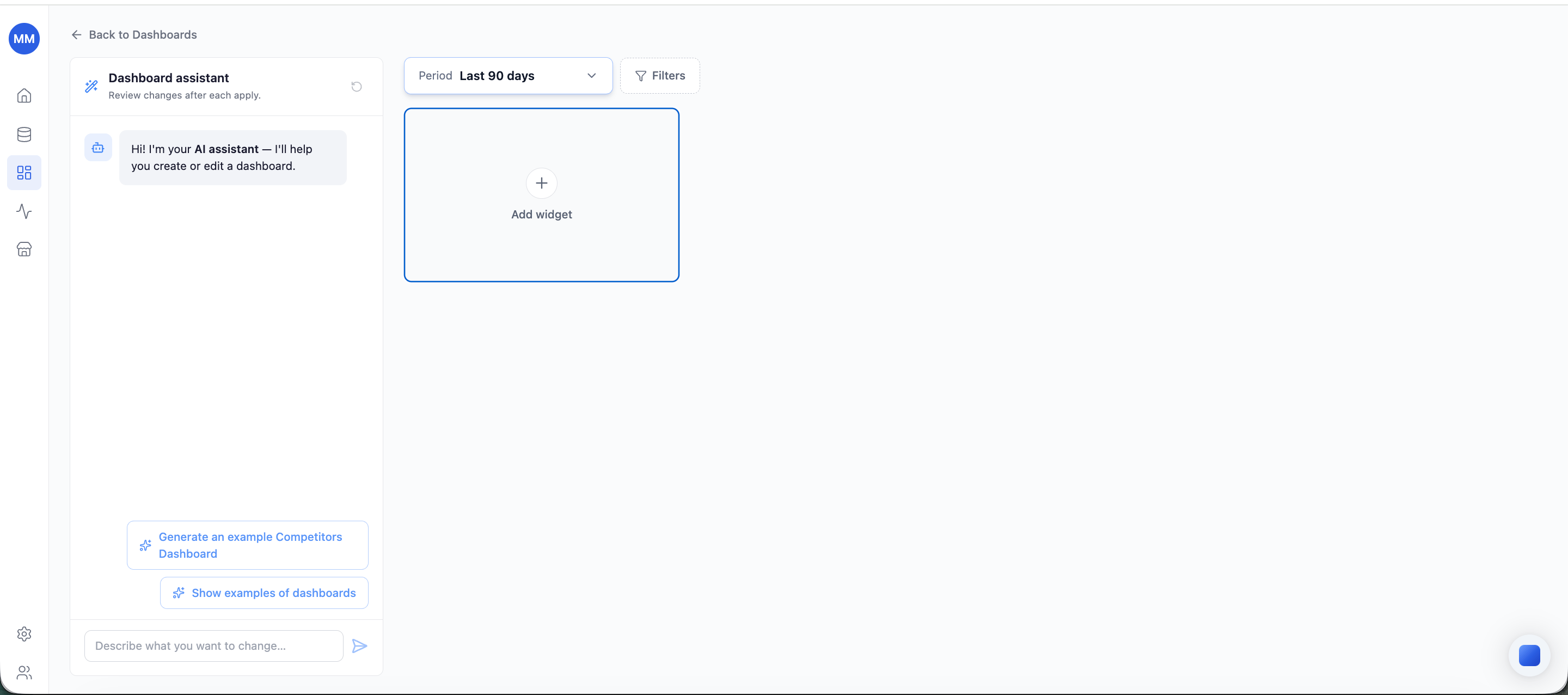
The **dashboard editor** is the single place to create and modify dashboards. It combines two panels working on the same dashboard configuration:
* **Dashboard Builder** - direct manipulation: add widgets, arrange the layout, set filters.
* **Dashboard assistant** - AI panel on the left: describe a change in plain language and it's applied to the dashboard. The panel can be hidden when you don't need it.
Whatever one panel changes, the other sees - prompt first and fine-tune by hand, or build by hand and ask the assistant to extend it.
 ## Open the editor
From the [Dashboards](/dashboards/overview) page, create a new dashboard or open an existing one for editing. Built-in dashboards open in the editor too - they're fully editable (see below).
## Name and description
Every dashboard has a required **name** and an optional **description**. Enter them manually, or let the [Dashboard assistant](/dashboards/create-with-ai) generate and update them to match the dashboard's content.
## Add and remove widgets
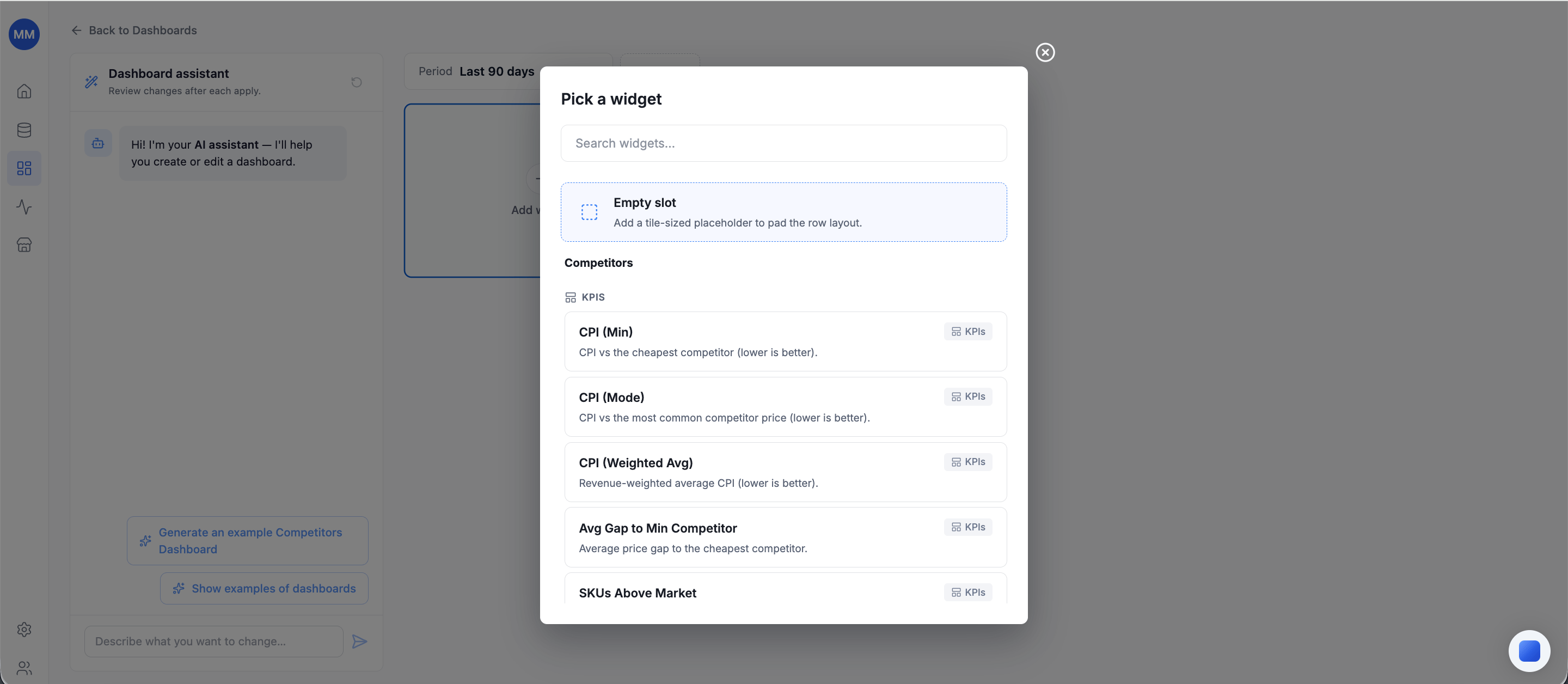
* An **Add widget** tile is always visible. Click it to open the **widget picker** - a searchable list of every available widget, each with its title, description, and type (KPIs, chart, table).
* Each widget on a dashboard is unique. Widgets already present are marked as added in the picker and can't be selected twice.
* Remove a widget via its overflow menu (⋮) → **Delete**, with a confirmation step.
## Open the editor
From the [Dashboards](/dashboards/overview) page, create a new dashboard or open an existing one for editing. Built-in dashboards open in the editor too - they're fully editable (see below).
## Name and description
Every dashboard has a required **name** and an optional **description**. Enter them manually, or let the [Dashboard assistant](/dashboards/create-with-ai) generate and update them to match the dashboard's content.
## Add and remove widgets
* An **Add widget** tile is always visible. Click it to open the **widget picker** - a searchable list of every available widget, each with its title, description, and type (KPIs, chart, table).
* Each widget on a dashboard is unique. Widgets already present are marked as added in the picker and can't be selected twice.
* Remove a widget via its overflow menu (⋮) → **Delete**, with a confirmation step.
 Widgets visualize the same filtered dataset from different angles - one dashboard is one analytical view, which is why duplicates and per-widget filters don't exist.
## Filters
The filter bar above the dashboard content applies to **every widget**:
* **Period** - always present. Presets from yesterday through last 7 / 30 / 90 / 180 days, last year, last 5 years, and all time.
* **Filters** - attach **Store**, **Country**, **Zone**, **Category**, **Brand**, or **Competitor** filters next to the Period control.
Change any filter and every widget refreshes with the new scope.
## Arrange the layout
The layout is rows of widgets:
* **Drag & drop** to reorder widgets within a row or move them between rows.
* Drop a widget on the **bottom drop zone** to start a new row.
* Widgets stretch to fill their cell; KPI cards and chart cards keep their natural heights, so the editor works best when similar widget types share a row.
## Auto-save
The editor saves automatically as you work - watch for **Saved · Just now** beneath the dashboard name. There is no separate save step, including for changes made by the assistant.
## Built-in dashboards: edit and reset
The built-in dashboards are editable like any other - widgets, filters, metadata, layout. Two guarantees keep them safe:
* **Reset** restores the original built-in configuration at any time.
* They can't be permanently deleted - a removed built-in dashboard is recreated from its default template.
## Related
* [Dashboards overview](/dashboards/overview)
* [Create a dashboard with AI](/dashboards/create-with-ai)
* [Metrics glossary](/reference/metrics)
Widgets visualize the same filtered dataset from different angles - one dashboard is one analytical view, which is why duplicates and per-widget filters don't exist.
## Filters
The filter bar above the dashboard content applies to **every widget**:
* **Period** - always present. Presets from yesterday through last 7 / 30 / 90 / 180 days, last year, last 5 years, and all time.
* **Filters** - attach **Store**, **Country**, **Zone**, **Category**, **Brand**, or **Competitor** filters next to the Period control.
Change any filter and every widget refreshes with the new scope.
## Arrange the layout
The layout is rows of widgets:
* **Drag & drop** to reorder widgets within a row or move them between rows.
* Drop a widget on the **bottom drop zone** to start a new row.
* Widgets stretch to fill their cell; KPI cards and chart cards keep their natural heights, so the editor works best when similar widget types share a row.
## Auto-save
The editor saves automatically as you work - watch for **Saved · Just now** beneath the dashboard name. There is no separate save step, including for changes made by the assistant.
## Built-in dashboards: edit and reset
The built-in dashboards are editable like any other - widgets, filters, metadata, layout. Two guarantees keep them safe:
* **Reset** restores the original built-in configuration at any time.
* They can't be permanently deleted - a removed built-in dashboard is recreated from its default template.
## Related
* [Dashboards overview](/dashboards/overview)
* [Create a dashboard with AI](/dashboards/create-with-ai)
* [Metrics glossary](/reference/metrics)